
Content

Content

Design

Design

AI

AI

Claude Design: What Is It and Why Does B2B Care?

Claude Design: What Is It and Why Does B2B Care?

I spent three hours testing Anthropic's newest tool, I one-shot a working app prototype, generated a fully designed pitch deck, and handed it off to Claude Code. Here's the exact workflow, the real prompts, and an honest take on who it's actually for.

I spent three hours testing Anthropic's newest tool, I one-shot a working app prototype, generated a fully designed pitch deck, and handed it off to Claude Code. Here's the exact workflow, the real prompts, and an honest take on who it's actually for.

Apr 29, 2026

12 mins
Anthropic shipped Claude Design on April 17, 2026. I spent three hours breaking it.

I one-shot a working app prototype. I generated a fully designed pitch deck. I handed a product demo off to Claude Code.

By the end of this post, you'll know the exact workflow to turn a rough idea into a working, on-brand prototype in under ten minutes - plus the four starting points, the five-step process, the four refinement tools, and the one setup step most people will skip.

What Is Claude Design? (Complete Breakdown)

Claude Design is a canvas-based AI design tool built into Claude.ai. It allows users to create professional-grade visuals through conversation, no design skills required.

Here’s how it works:

  • You describe what you need

  • Claude generates a live design

  • You refine it with edits or sliders

  • You export or ship instantly

This workflow can be summarized as:

Describe → Build → Refine → Export

Key Features of Claude Design
  • AI-generated pitch decks and landing pages

  • Real-time design editing via chat

  • Built-in brand system learning

  • Export options: PDF, PPTX, HTML

  • Custom sliders for spacing, colors, and layouts


What Makes Claude Design Different?

Unlike tools like Canva or Figma, Claude Design learns your brand upfront.

During onboarding, it analyzes:

  • Design files

  • Fonts

  • Color systems

  • UI components

This means every design you create is automatically on-brand, no templates needed.

The 4 Starting Points

Claude Design opens with four project types. Pick the one that matches your output:

1. Prototype - for app UIs, dashboards, and SaaS editors. This is where most B2B teams will spend the most time.

2. Pitch Deck - for slides, investor decks, and client presentations. Output is HTML-coded slides, not a static image deck.

3. From Template - for interactive product pages and landing demos with animations and scroll effects.

4. Design System - for when you want Claude to learn your brand before generating anything else. Do this first. Always.
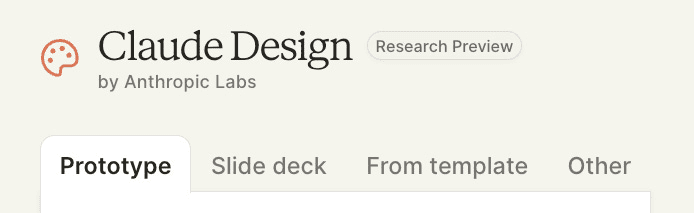
Each runs the same two-step flow: upload your brand kit, write a brief. Everything else happens inside the editor.

The 5-Step Workflow

Before You Start: Set Up Your Design System

This is the step most people skip. Don't.

Build your design system first. Every project you run after that inherits it. Skip this and your assets will drift off-brand within three prompts. Anthropic's own admin guide for Team and Enterprise plans covers the full setup process.
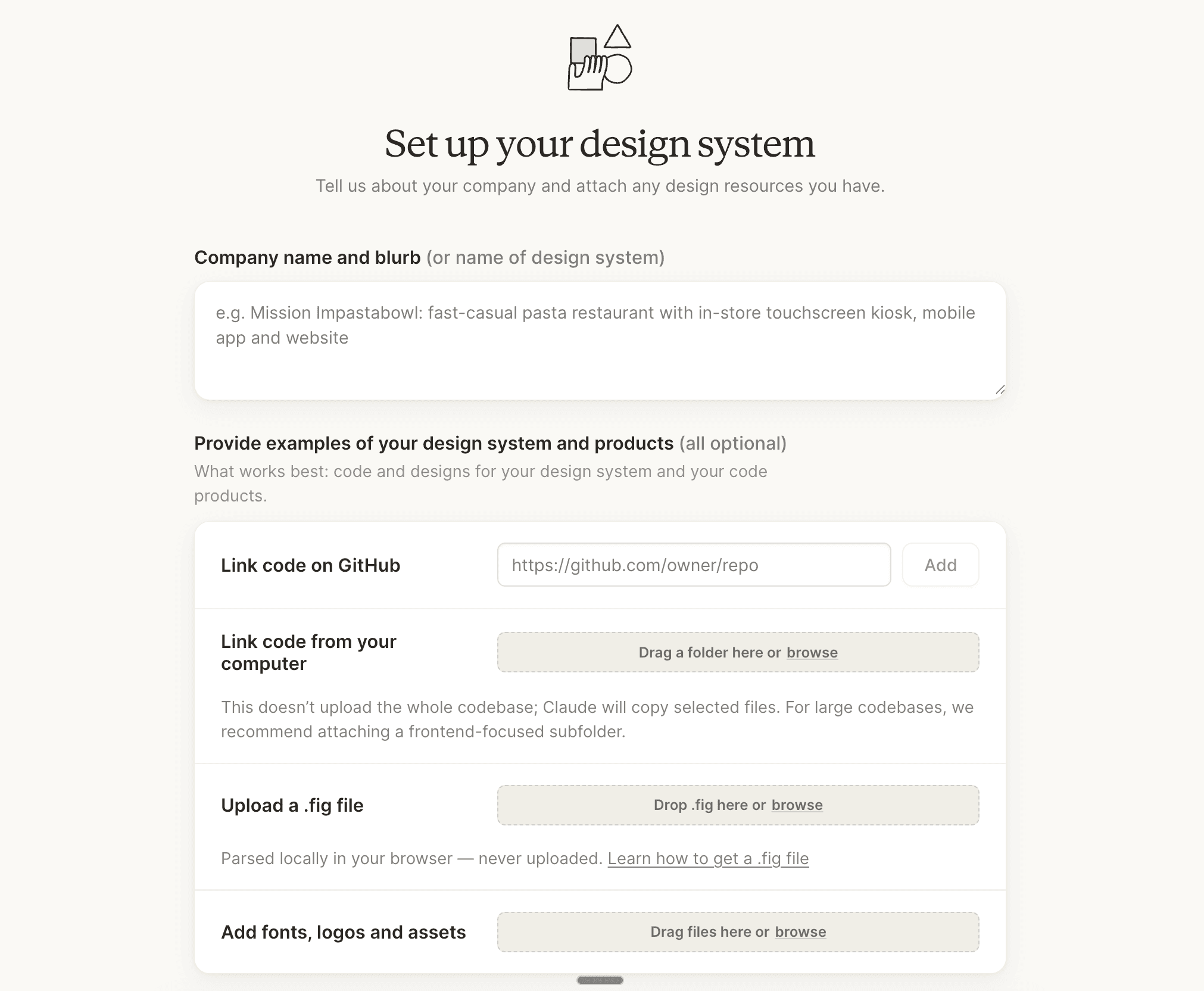
During setup, Claude does four things automatically:

  • Reads your codebase

  • Reads your existing design files

  • Builds a shared design system for your team

  • Auto-applies your branding and components to every project going forward

Your prototypes come out on-brand. Your pitch decks match. Your landing pages pull the same spacing rules. Design system first - assets second.

How to Build a Pitch Deck from Scratch

The Slide deck flow follows the same project setup. Output is HTML-coded slides rather than a web app.

A 12-slide seed round pitch deck took around 8 minutes to generate - longer than a Canva template, but the output is stronger: custom layouts, proper logo use, and on-brand typography that actually matches your brand rather than a generic theme. TechCrunch's launch coverage confirmed pitch decks and presentations as one of the four primary use cases Anthropic designed the tool around.

Here's the exact prompt used:


Build a 12-slide Vislo seed round pitch deck. Slides in order.
Title with logo and tagline. Problem: the time cost of designing 
infographics manually. Solution: prompt to branded infographic in 
seconds. Product Demo: three editor screenshots. Market Size with a 
TAM SAM SOM chart. Business Model: tiered subscription. Traction: 
MRR chart plus waitlist number. Competition: a 2x2 matrix 
positioning against Canva, Figma, and Visme. Go-to-Market: 
creator-led distribution via LinkedIn. Team: founder photos and 
short bios. 18-month Roadmap: quarterly milestones. The Ask: £750k 
round with use of funds pie chart. Export-ready as PPTX and send 
to Canva

Build a 12-slide Vislo seed round pitch deck. Slides in order.
Title with logo and tagline. Problem: the time cost of designing 
infographics manually. Solution: prompt to branded infographic in 
seconds. Product Demo: three editor screenshots. Market Size with a 
TAM SAM SOM chart. Business Model: tiered subscription. Traction: 
MRR chart plus waitlist number. Competition: a 2x2 matrix 
positioning against Canva, Figma, and Visme. Go-to-Market: 
creator-led distribution via LinkedIn. Team: founder photos and 
short bios. 18-month Roadmap: quarterly milestones. The Ask: £750k 
round with use of funds pie chart. Export-ready as PPTX and send 
to Canva

Build a 12-slide Vislo seed round pitch deck. Slides in order.
Title with logo and tagline. Problem: the time cost of designing 
infographics manually. Solution: prompt to branded infographic in 
seconds. Product Demo: three editor screenshots. Market Size with a 
TAM SAM SOM chart. Business Model: tiered subscription. Traction: 
MRR chart plus waitlist number. Competition: a 2x2 matrix 
positioning against Canva, Figma, and Visme. Go-to-Market: 
creator-led distribution via LinkedIn. Team: founder photos and 
short bios. 18-month Roadmap: quarterly milestones. The Ask: £750k 
round with use of funds pie chart. Export-ready as PPTX and send 
to Canva

Build a 12-slide Vislo seed round pitch deck. Slides in order.
Title with logo and tagline. Problem: the time cost of designing 
infographics manually. Solution: prompt to branded infographic in 
seconds. Product Demo: three editor screenshots. Market Size with a 
TAM SAM SOM chart. Business Model: tiered subscription. Traction: 
MRR chart plus waitlist number. Competition: a 2x2 matrix 
positioning against Canva, Figma, and Visme. Go-to-Market: 
creator-led distribution via LinkedIn. Team: founder photos and 
short bios. 18-month Roadmap: quarterly milestones. The Ask: £750k 
round with use of funds pie chart. Export-ready as PPTX and send 
to Canva

PowerPoint export produces an editable file. Slide structure and most styling carry over, though rendering is close rather than pixel-perfect. For client-facing decks, finish your edits inside Claude Design before exporting.

How to Build an Interactive Product Demo

The animation-heavy template style was also tested for an interactive product demo. The result felt like a proper product site - hover effects, scroll animations, embedded demo placeholders, and sections flowing into each other.

Here's that prompt:


Build a live interactive Vislo product demo page. Centre the page 
on a working prompt box where a visitor types a brief like 
"Quarterly revenue chart" and watches an infographic assemble 
element by element in real time, with subtle typing sounds and 
element-by-element animation. Include a voice input mode with a 
microphone button in the prompt box and live transcription appearing 
as the visitor speaks. Background holds a slow 3D isometric scene 
of floating infographic blocks. Floating toolbar at the top, 
revealed on scroll. Dark mode toggle in the top right. Include a 
subtle particle effect around the canvas as generation completes

Build a live interactive Vislo product demo page. Centre the page 
on a working prompt box where a visitor types a brief like 
"Quarterly revenue chart" and watches an infographic assemble 
element by element in real time, with subtle typing sounds and 
element-by-element animation. Include a voice input mode with a 
microphone button in the prompt box and live transcription appearing 
as the visitor speaks. Background holds a slow 3D isometric scene 
of floating infographic blocks. Floating toolbar at the top, 
revealed on scroll. Dark mode toggle in the top right. Include a 
subtle particle effect around the canvas as generation completes

Build a live interactive Vislo product demo page. Centre the page 
on a working prompt box where a visitor types a brief like 
"Quarterly revenue chart" and watches an infographic assemble 
element by element in real time, with subtle typing sounds and 
element-by-element animation. Include a voice input mode with a 
microphone button in the prompt box and live transcription appearing 
as the visitor speaks. Background holds a slow 3D isometric scene 
of floating infographic blocks. Floating toolbar at the top, 
revealed on scroll. Dark mode toggle in the top right. Include a 
subtle particle effect around the canvas as generation completes

Build a live interactive Vislo product demo page. Centre the page 
on a working prompt box where a visitor types a brief like 
"Quarterly revenue chart" and watches an infographic assemble 
element by element in real time, with subtle typing sounds and 
element-by-element animation. Include a voice input mode with a 
microphone button in the prompt box and live transcription appearing 
as the visitor speaks. Background holds a slow 3D isometric scene 
of floating infographic blocks. Floating toolbar at the top, 
revealed on scroll. Dark mode toggle in the top right. Include a 
subtle particle effect around the canvas as generation completes

Who Is Claude Design Actually For?

Claude Design is not a full Lovable replacement.

Lovable still wins if you want one-click hosted deployment with zero codebase management. If your goal is a shipped, publicly hosted app with no local environment, that remains the faster path.

For anyone already inside the Claude Code ecosystem, Claude Design is the missing design layer - with a direct, native path to production. It removes the painful first 80% of the work: getting from a rough idea to something visual, on-brand, and ready to hand to an engineer.

The broader picture: Anthropic shipped Claude Opus 4.7 and Claude Design in the same week, alongside a 3x jump in Claude's vision benchmark scores. They are shipping design, coding, and computer vision in parallel - and the product suite is starting to look like a complete stack. VentureBeat noted that the simultaneous launches mark a clear push from foundation model provider to full-stack product company. The company surpassed $30 billion in annualized revenue by early April 2026 and is in early IPO conversations with major banks.

Your design workflow is about to compress. The question is how fast you adapt it.

Frequently Asked Questions

Do I need a design background to use Claude Design?

No. Anthropic's official launch post is explicit: Claude Design was built for founders, product managers, and marketers who need to go from an idea to something visual before involving a designer. The entire interface is conversational. If you can write a clear brief, you can use Claude Design.


What's the difference between Wireframe and High-fidelity mode?

Wireframe mode produces a structural layout without polished visuals - useful for locking in the information architecture before committing to a visual direction. High-fidelity produces a fully styled, on-brand design. The recommended workflow is to start in Wireframe, confirm the layout, duplicate the project, then switch to High-fidelity. This avoids rebuilding polished work around structural changes and saves token usage. This approach is consistent with prompt engineering best practices that emphasise breaking complex tasks into structured steps.


Why should I set up the Design System before anything else?

Because every project you create after onboarding inherits it. Skip this step and Claude has no brand context to work from - outputs will drift off-brand within a few prompts. During setup, Claude reads your codebase, existing design files, fonts, and logo assets and builds a shared design system for your entire team. Everything downstream uses it automatically. Full setup instructions are in the Claude Design admin guide.

Charlie Hills


Charlie Hills

Copy link

Copy link

20,000+ Active Readers

Join 20,000+ founders, creators, and marketers who use my playbooks to grow faster on LinkedIn and turn AI into a competitive edge.

Join 20,000+ founders, creators, and marketers who use my playbooks to grow faster on LinkedIn and turn AI into a competitive edge.

I break down what is working, why it works, and how to apply it to your own content in under five minutes every week.

I break down what is working, why it works, and how to apply it to your own content in under five minutes every week.
